Example
Rent Manager AI: a portfolio KPI dashboard from one prompt
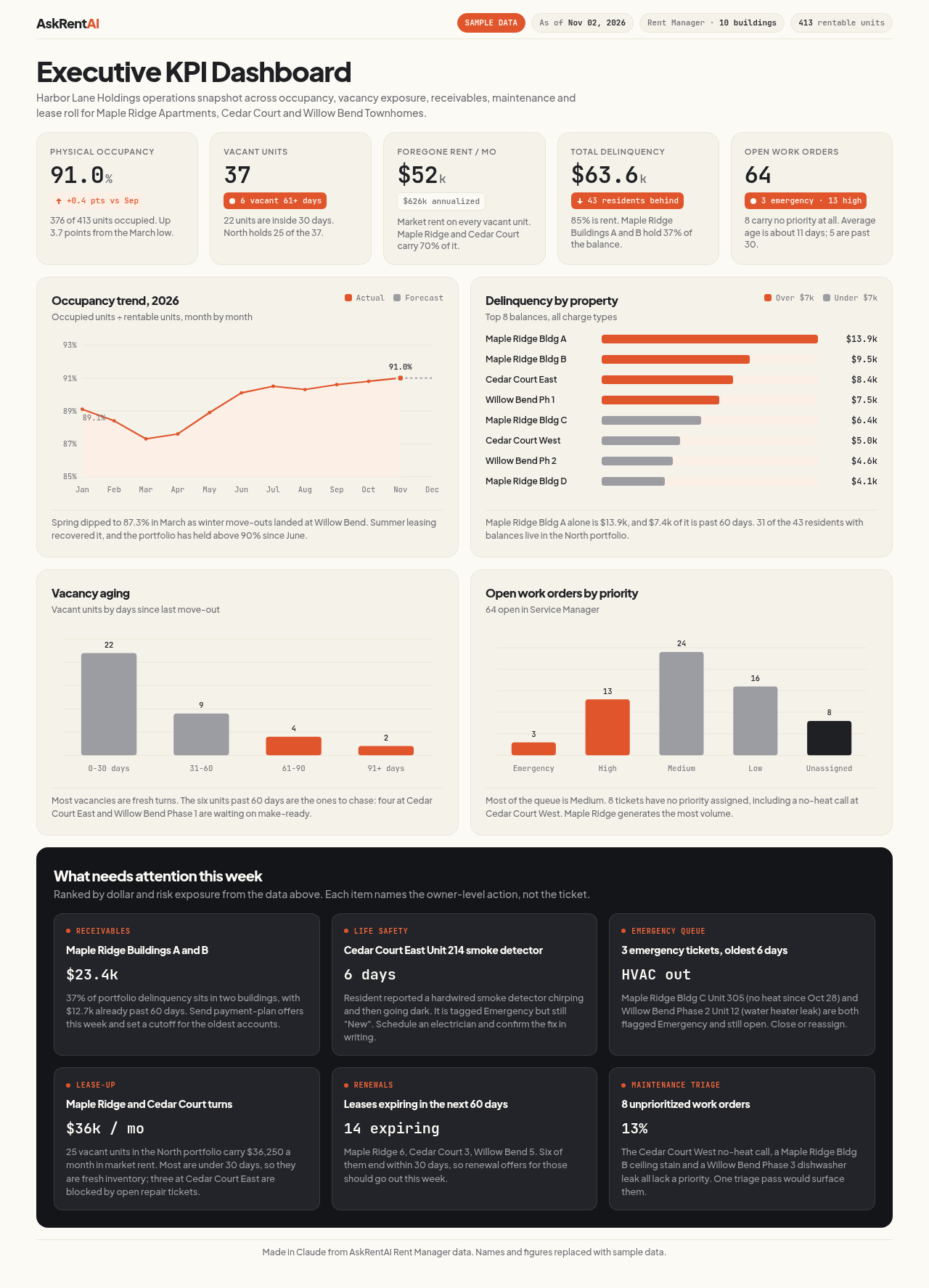
Connect your AI app to Rent Manager with AskRentAI, paste one prompt, and the AI app draws a one-page KPI dashboard from your data. Here is a real example and the exact prompt, so you can run it yourself.
The exact prompt
Using my AskRentAI Rent Manager data, design a stunning executive KPI dashboard as a single-file HTML artifact. Pull real numbers for occupancy, vacant units and foregone rent, total delinquency, open work orders by priority, and leases expiring in the next 60 days. Make it look like a premium SaaS product: clean typography, KPI cards with trend indicators, and 3-4 polished charts. Add a short 'What needs attention this week' panel based on the data.
Plus an AskRentAI style block.
Paste it into your AI app after you connect AskRentAI to your Rent Manager account. Your own properties and numbers replace the sample.
A second example
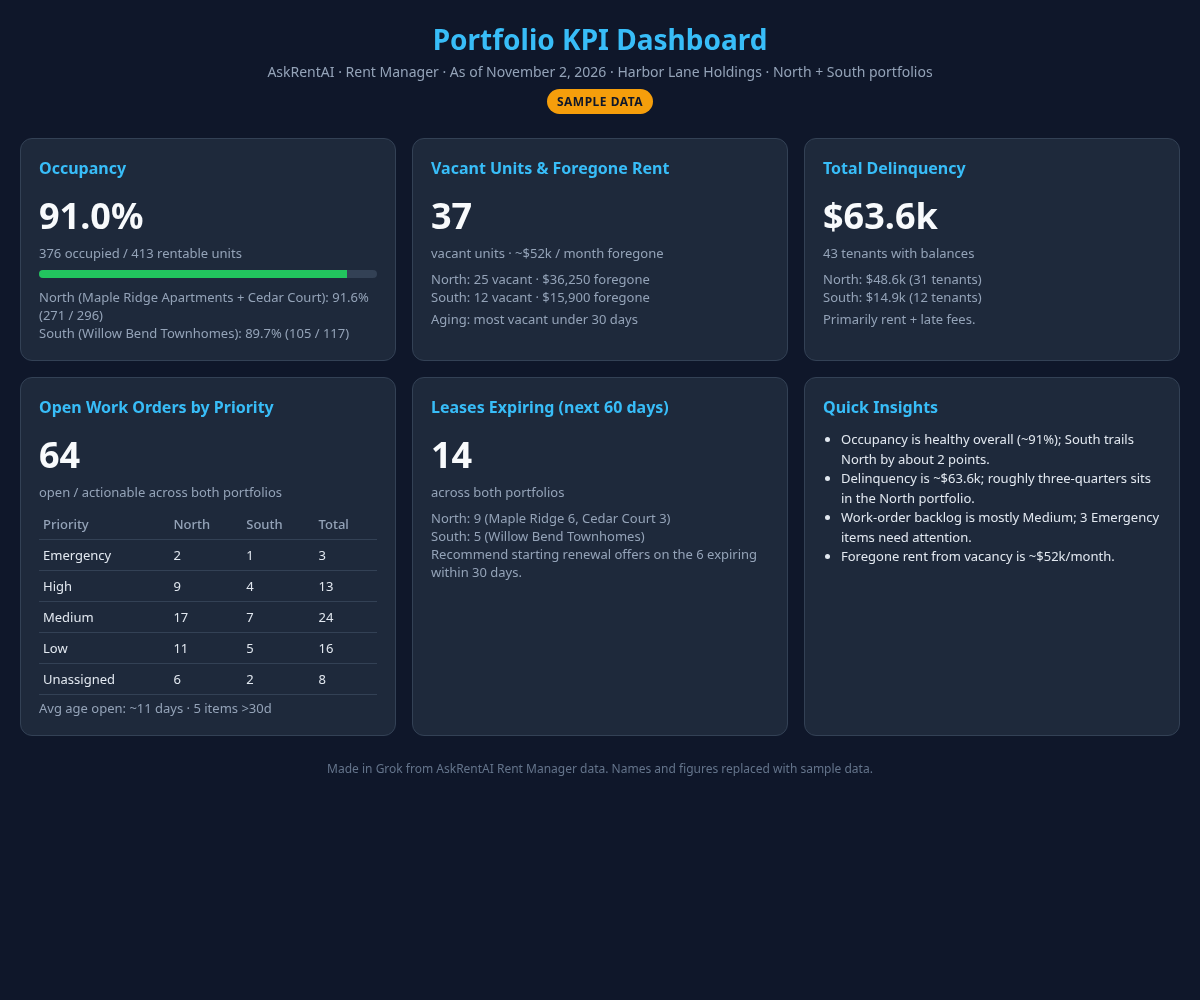
The same dashboard from a different AI app, with a shorter prompt. Each app draws in its own style.
The exact prompt
Using my AskRentAI Rent Manager data, build me a one-page portfolio KPI dashboard as a visual artifact: occupancy, vacant units and foregone rent, total delinquency, open work orders by priority, and leases expiring in the next 60 days.
Paste it into your AI app after you connect AskRentAI to your Rent Manager account. Your own properties and numbers replace the sample.
What the dashboard covers
The prompt asks your AI app for five things on one page:
- Occupancy across your portfolio.
- Vacant units and foregone rent, so you can see what empty units are costing.
- Total delinquency, who is behind and how much.
- Open work orders by priority, so urgent items stand out.
- Leases expiring in the next 60 days, ahead of renewal conversations.
The layout and the numbers come from the AI app and from your Rent Manager records at the moment you ask. The figures in the images above are sample data and say nothing about any real portfolio. Answers reflect what is recorded in Rent Manager.
For one topic at a time, see the guides for the delinquency report and the lease expiration report.
Keep it current
Save the prompt somewhere handy, such as a note or a saved prompt in your AI app. Ask again every week or every month and you get a new dashboard with the latest numbers.
Use Claude, ChatGPT or Grok
You are not tied to one AI app. Connect the one your team already uses and paste the same prompt:
The first example was made in Claude and the second in Grok. Each AI app draws its dashboard in its own style, and results differ from one to the next. To answer your question, the records needed are sent to the AI app you choose, so check that tool's data settings for your team.
More Rent Manager AI guides
- Rent Manager dashboards with AI, more dashboards you can ask for.
- Rent Manager AI, what AskRentAI is and how it works.
- Rent Manager reporting with AI, more kinds of questions.
- Rent Manager delinquency report, by property.
- Rent Manager lease expiration report, what is coming up.
Build your own dashboard
Seven days free. No credit card. Connected in about ten minutes. Self-serve, no sales call.
Start your free trial $10 per user per month after the trial · cancel anytime